


STORYBOARD: Tips and Tricks

Actualizado: 28 mar 2022

I'm not an expert in this area, as my main focus is character design and illustration, but I do know a few tips and tricks about storyboards.
First of all, storyboards are not comics, and the storytelling techniques requieted for each of them are completely different. Usually, storyboards are the key step between a script and the recording/animation process. The few storyboards I've done have always been for animation but they're also used in live action movies and series and even in adds! It helps directors and producers understand better the script (they're awful at imagining things if you don't literally show them. Seriously, they can't imagine shit).
Most of the things I'll tell are applied for animation, I don't know much about live action, although they're pretty similar.
You have to think as an animator or have some basic knowledge in camera movements and types of shots to create a storyboard, as it's the basis of them. How will these characters act in this scene and from which point of view will the audience see them? I recommend studying a bit about cameras and shots before starting your storyboard, it'll be very important! For movies or more complicated shorts the shots and camera movements tend to be more rich and challenging, with more perspectives and camera movements. For kids animation it tends to be way simpler. Compare the different shots and camera placements in a big production like Frozen and then have a look at a couple of chapters from Peppa Pig. The second one will have static cameras and simple shots for conversations, as the story telling doesn't require much more.
Try to look for some specific information about storyboards too, there's a whole world of terms and words used specifically for storyboards and I don't have enough time and patience to get in detail hahaha. Go on the internet and do some quick search about Storyboarding 101. Look at the portfolios of other storyboard artists too, analyze how they resolve scenes and situations, everyone has a different storytelling style!
KEEP IT SIMPLE. I can't tell it more clear. It doesn't matter how ugly and out of character it looks. There's probably a second pass for clean up or even a completely different person who'll do this for you (Storybowrd supervisors). For now, the important thing is putting the script in visuals. The more simple it is, the easier it'll be to implement changes and cut , add or move scenes (and believe me, it'll happen a lot). You'll be glad you did an ugly ass drawing when you find yourself deleting half your storyboard to correct it. Once it's all done and everything works together, you'll be able to make it prettier.

Animators appreciate more a storyboard with clear actions, hook-ups and cameras that make sense rather than a pretty one (Believe me, I've had trouble with this before).
You don't even need to add colour, most of them are in grayscale or just a completely white background. But it's very VERY important to use grids and perspective lines! This will help you place your characters properly on the scene and give clues about the angles of the camera. You can apply this tip for your ilustrations too, grids are saviours!
You might need to add keyposes to your storyboard, so the animators know what movements the characters are doing and when. If you don't know what a keypose is, have a look at some animation sites where they explain the basics!
If you don't know how to create a proper script to do a storyboard or it's to complicated for you (scripts are tiring!) just look for the script of whatever movie or series you like online! There's plenty of them! Pick a scene you like and start practicing like that. That's the first assignments we got in the storyboard classes at uni. Once you feel confident enough with your storytelling and technique you can try making your own!
Every piece of media is a reference. If you want some examples, the next time you sit down to watch a series or movie try to analize the types of shots, angles, camera movements and whatever they're using! If you like them, try them on your storyboards. Every series and every storyboard artists has their voice.
You don't need any special tool or program to make a storyboard. You can even make it on paper, that's how I started. Look for a template online and print it, you can start drawing there. You can download a template and use it in whatever drawint program you draw with too! There's also specific programs meant for storyboarding like StoryBoard Pro. This one is very good, it has lots of options and it let's you add a lot of info + you can create animatics directly. But it's expensive, so you might want to try other mediums if your goal it's not being a full time storyboard artist yet!
Here's some pages of storyboards I've done. First one it's from February 2021, I started doing it for a Storyboard portfolio but had to stop.

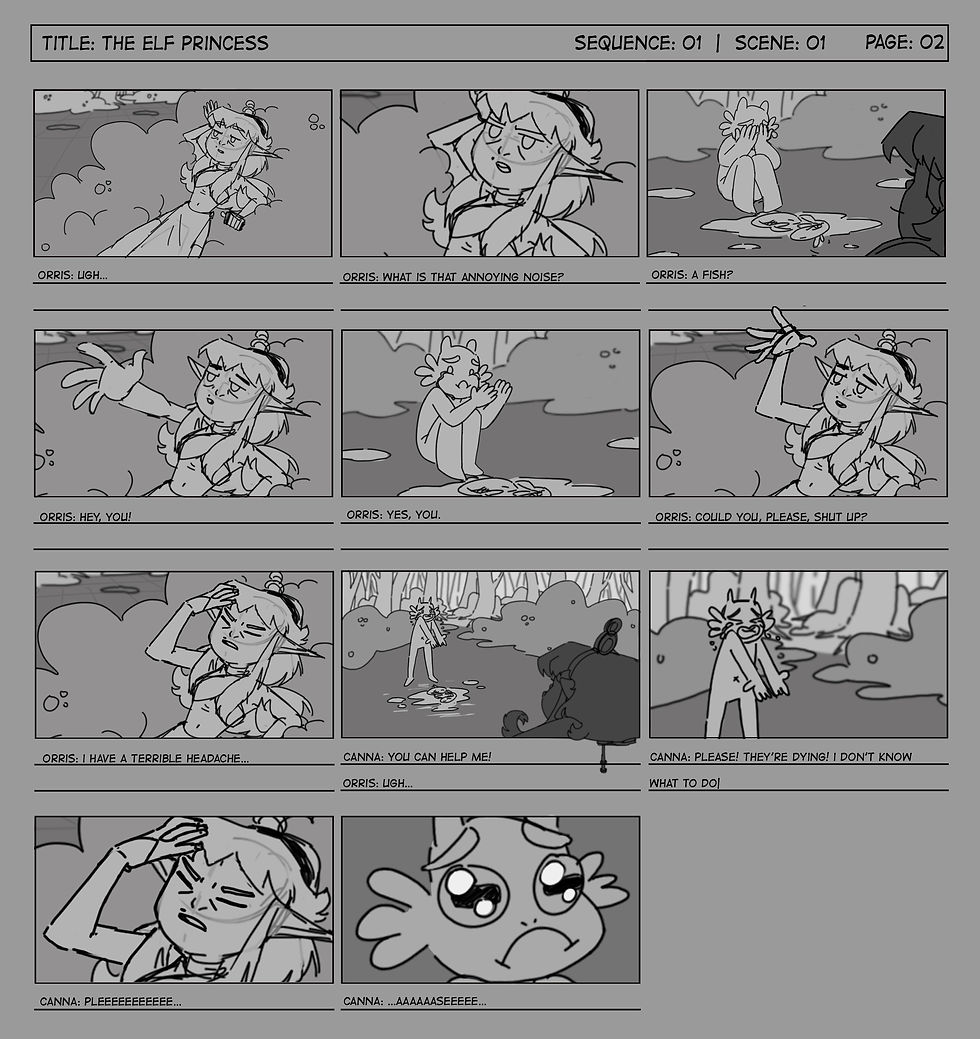
This one's from November 2018. It's incomplete because I only did the storyboard for part of the script! It was our Senior Project at university and two of my teammates worked on it too. Later I created an animatic out of it, where times and rythms can be seen better.

That's all!
I guess I could stay here for hours talking about things you could or shouldn't do, but I think this is more than enough for now! I hope it was useful for you, at least to consider starting your own storyboard. Remember that comics and storyboards are two completely different worlds with different storytelling techniques!

I'm an animator, and if you give a close look to my comics, sometimes they have more storyboard storytelling than I would like to, I'm still learning. I recommed looking for proffesional storyboard portfolios, you'll learn much more from them!
If you have any specific question don't hesitate in reaching me through here or my DMs in any social media, I'll try to answer the best I can! You're very welcome to give your opinion on the comments or leave your own tips! Thank you very much for reading!

Comentarios